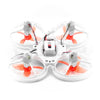
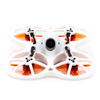
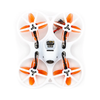
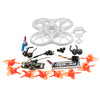
EZ Pilot Beginner Indoor Racing Drone - With Controller & Goggle RTF

Product Code: 0110001095

Availability:In stock

$144.99
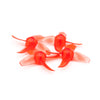
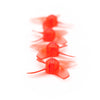
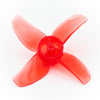
Beginner tipKeep spare props on handBumping into a wall or chair is part of learning, and propellers are the part that takes the knocks. A spare set of four snaps right on, so a chipped prop never ends the session.
EMAX EZ Pilot

Your very first FPV drone · drone, controller and goggles in one box

Flying made easy. Really easy.

The EZ Pilot runs EZ Flight, flight software we wrote ourselves to take the hard parts out of learning. It holds its own height, levels itself when you let go, steers with one stick, and settles gently to the floor when you pull the throttle all the way down. Put on the goggles and you are flying from the cockpit, right in your living room.

  • Smart Height Assist
  • One-stick steering
  • Gentle landings
  • Self-leveling
  • Ages 14+
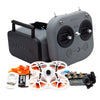
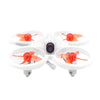
The EMAX EZ Pilot drone with its white controller and FPV goggles

New to this? Start here

So, what is FPV?

FPV means “first-person view.” A tiny camera on the front of the drone sends live video to your goggles, so instead of watching the drone from across the room, you see what it sees, as if you were sitting in the cockpit.

EZ Flight software

Our own flight software, built for first flights.

Learning to fly usually means juggling throttle, tilt and turning all at once. EMAX wrote EZ Flight specifically for the EZ Pilot to handle the tricky parts for you, so your first flights feel like flying, not wrestling.

The EZ Pilot controller with its right stick pushed and glowing, and the drone following a smooth curved path through a living room
EZ One Stick Control

Steer with one thumb

Normally, turning a drone means working two sticks at once: one to tilt and one to turn. In Easy mode, EZ One Stick Control blends them together, so you just push the right stick forward to fly ahead and left or right to turn, a bit like steering a car.

The EZ Pilot hovering at a steady height above a living room floor, with a red dashed line marking the height it holds
Smart Height Assist

It holds its own height

Learning to manage throttle is the hardest part of flying. In Easy and Intermediate modes, a built-in barometer senses air pressure and keeps the EZ Pilot at a steady height for you, so you can focus on where you want to go. In Easy mode, push the throttle stick all the way up to climb or all the way down to descend, both at a steady speed. Anywhere in between, it holds its height.

A faint tilted EZ Pilot next to a solid, level EZ Pilot, with a red arrow showing it returning to level
Self-leveling

Let go, and it levels out

A built-in gyroscope senses every tilt. Center the stick and the EZ Pilot rights itself and settles into a level hover, so a wobbly moment doesn’t become a crash.

The EZ Pilot descending gently onto a rug, with a red low-battery icon
Gentle landings

Pull the stick all the way down, and it lands

In Easy and Intermediate modes, pull the throttle stick all the way down and the EZ Pilot descends slowly, touches down and stops its motors. In Advanced mode, fly it down to the floor yourself, then hold the throttle low until the motors stop. When the battery reaches 3.3V, it lands itself automatically.

Three flight modes

Start easy. Flip a switch when you’re ready.

The right switch on the controller steps through three modes. Each one hands you a little more control, and Advanced opens up bigger tilt angles and faster moves, so the EZ Pilot keeps up as your skills grow.

Three EZ Pilot drones from left to right, one for each flight mode
Switch position 1

Easy

  • Smart Height Assist holds your height
  • EZ One Stick Control steering
  • Throttle stick all the way up to climb, all the way down to descend
  • Small tilt angles and a slow, calm speed
Switch position 2

Intermediate

  • Smart Height Assist still holds your height
  • Still self-leveling
  • Regular two-stick control
  • Same gentle tilt limits and slow speed as Easy
Switch position 3

Advanced

  • Full manual throttle
  • Bigger tilt angles for faster moves
  • The way experienced FPV pilots fly

Made for first flights

Small, light and made for indoors.

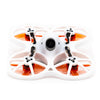
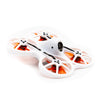
The EZ Pilot fits in your hand and has a guard around every propeller, so living rooms, garages and open indoor spaces become your flying field.

  • Easy mode first. Height hold, one-stick steering and gentle speeds while you learn.
  • Guarded propellers. Round guards protect the props when you brush past furniture.
  • About 4 minutes per battery. Enough for a few laps of the room, then swap or recharge.
  • Flies straight from the box. The drone, controller and goggles arrive already paired and on the same video channel.
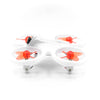
The EZ Pilot drone resting in an open hand

Charge up

Charge the flight battery with the USB charger, and the controller and goggle battery pack over micro-USB.

Power on

Turn on the controller and goggles, then plug in the drone and set it on a flat surface for a few seconds while it calibrates.

Fly by sight in Easy mode

With the right switch in Easy mode and the throttle all the way down, flip the left switch to arm. Push the throttle stick all the way up to lift off, ease it back toward the middle to hold that height, and practice steering with one stick while you watch it.

Put on the goggles

Once steering feels natural, fly through the goggles and see the room from the drone’s point of view.

Fly in a clear, open indoor space away from people and pets, and keep the drone where you can control it. Always disarm before picking it up, and disarm right away after a crash.

EZ Pilot kit contents laid out: goggles, controller, drone, battery, charger, cable, propellers and decals
Kit contents shown

What’s in the box

Everything to fly, in one box.

  • EZ Pilot FPV drone×1
  • EZ Pilot controller×1
  • Transporter 5.8GHz FPV goggles with antenna×1
  • Rechargeable 18650 goggle battery pack×1
  • 1S 450mAh HV flight battery×1
  • USB battery charger×1
  • Spare propellers2 CW + 2 CCW
  • Micro-USB cable×1

The controller and goggle battery pack charge over micro-USB, so a USB wall adapter is handy. Images may differ slightly from the product in the box.

The gear in the kit

A comfy controller and real FPV goggles.

  • EZ Pilot controller. A game-pad style 2.4GHz controller that fits in your hands, with an arm switch on the left, the flight-mode switch on the right and a rechargeable 18650 battery inside.
  • Transporter FPV goggles. Live 5.8GHz video from the drone’s camera, with an auto-scan button that finds its channel, plus brightness and contrast settings.
  • Room to upgrade. The goggles come with one antenna and have a second antenna port for later.
The EZ Pilot controller, Transporter FPV goggles and drone together

Where it leads

Your first step into a bigger hobby.

The EZ Pilot is the friendliest way in. When the Advanced mode starts to feel easy, there is a whole EMAX path waiting for you.

See it fly

From EMAX, the EZ Pilot story.

Questions from new pilots and gift-givers

Good to know.

Does it come ready to fly?

Yes. The drone, controller and goggles come already paired and on the same video channel. Charge the flight battery, controller and goggle battery pack, then power on and fly.

Is this a good gift?

It is one of the easiest ways to try real FPV, for teens 14+ and adults, and a fun thing to share as a family. Everything needed to fly is in one box. A spare prop set is a smart add-on.

What age is the EZ Pilot for?

It is not suitable for anyone under 14. It contains small parts, so keep it away from young children.

Is it hard to learn?

The EZ Pilot is built to make it easy. In Easy mode it holds its own height, steers with one stick and lands gently when you pull the throttle all the way down. Start by flying by sight in a clear room, then put on the goggles once steering feels natural.

Where can I fly it?

Indoors, in a clear and open space such as a living room, garage or gym, away from people and pets. Do not fly it outside in wind, rain or other bad weather.

How long does it fly?

About 4 minutes per fully charged 1S 450mAh HV battery. When the battery runs low (3.3V), the EZ Pilot lands itself, so you know it’s time to swap or recharge.

What happens if it crashes?

Bumps are part of learning. Disarm right away, check the props, and swap any chipped ones; spare 40mm prop sets snap on without tools. Replacement motors and a replacement drone are also available.

Can I use the controller with other drones?

No. The EZ Pilot controller is made for the EZ Pilot only. When you are ready for a radio you can carry into the wider hobby, the Tinyhawk Lite kit comes with an ExpressLRS radio.

For the technically curious

Full specifications

EZ Pilot drone

Flight software EMAX EZ Flight
Flight modes Easy, Intermediate, Advanced
Smart Height Assist Barometer height hold in Easy and Intermediate modes
Easy mode features EZ One Stick Control; full throttle up or down climbs or descends at a steady speed
Motors 0816 brushed
Propellers 40mm four-blade
Flight controller All-in-one with 4-in-1 3A ESC and EMAX 2.4GHz receiver
Camera 600TVL CMOS
Video transmitter 5.8GHz, 37 channels, 25mW
Battery 1S 450mAh HV (4.35V) LiPo
Flight time About 4 minutes
Low battery Automatic landing at 3.3V

EZ Pilot controller

Type 6-channel 2.4GHz EZ Pilot controller
Power 18650 Li-ion battery (installed), micro-USB charging
Switches Arm (left), flight mode (right)
Compatibility EZ Pilot drone only

Transporter FPV goggles

Video 5.8GHz analog, bands A/B/E/F/R/H, 8 channels each
Features Auto scan, brightness, contrast and saturation settings
Power Rechargeable 18650 battery pack (micro-USB)
Antenna 1 included, second SMA port for expansion

Designed in California. Ships set for standard unlicensed use; higher power or extra channels require an FCC amateur radio license in the US. Recommended for ages 14+. Specifications from the EMAX EZ Pilot user manual and quick start guide.

Beginner tipBefore you check out: grab a spare prop setBumping into a wall or chair is part of learning, and propellers are the part that takes the knocks. A spare set of four snaps right on, so a chipped prop never ends the session.

Customer Reviews

Based on 3 reviews Write a review